The Alexandrian

Archive for the ‘Roleplaying Games’ category

Go to Part 1

Pit traps are as old as the game itself, and their iconography is familiar to anyone who’s spent time gazing at dungeon maps. A little less familiar, perhaps, is the symbol for an open pit, but it’s not exactly a stranger to the dungeon, either.

Symbol - Pit Trap Symbol - Open Pit

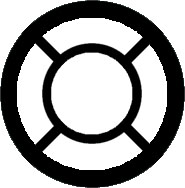
If you’re in need of a circular pit, it’s pretty easy to modify these familiar symbols to suit:
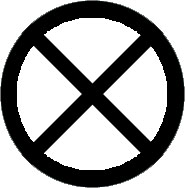
Symbol - Circular Pit Symbol - Open Circular Pit

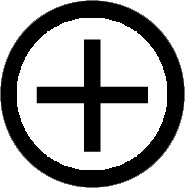
This leads us pretty comfortably to a discussion of trapdoors which are designed to be traversed (usually taking you to another level of the complex). These, too, have an established iconography:
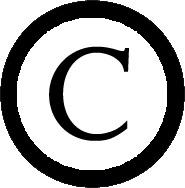

Symbol - Trapdoor in Ceiling Symbol - Trapdoor in Floor

With “C” indicating a trapdoor in the ceiling and “F” indicating a trapdoor in the floor.

But here things get a little confused, because you will also find some maps keying the “C” to mean “concealed trapdoor”. (Which matches the use of “C” to indicate concealed doors in general.) This matches the use of an “S” to consistently mean both “secret trapdoor” and “secret door”:
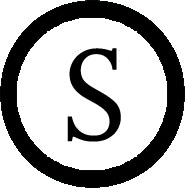
Symbol - Secret Trapdoor

So what I’m going to suggest is that our map symbols for trapdoors instead look like this:
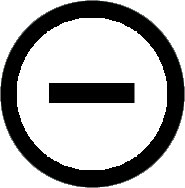
Symbol - Trapdoor Down Symbol - Trapdoor Up

And it’s now relatively simple to use “S+”, for example, to indicate a secret trapdoor going up. Or even a +/- to indicate trapdoors in both the floor and ceiling at the same spot.

The other argument for this is that it conveniently matches the UIS’s key for indicating the difference between pits in the floor and chimneys in the ceiling:
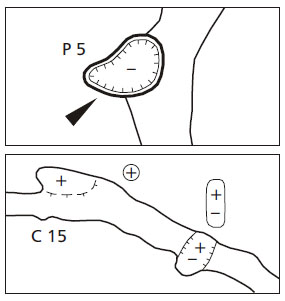
UIS Pits and Chimneys

Which looks pretty useful to me.

Final thought: Would it be useful to indicate the depth of a pit?
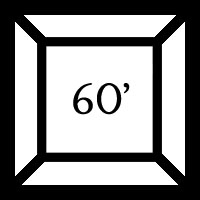
Symbol - Pit with Depth

The meaning seems fairly clear, but it might be muddier if we were dealing with a closed pit. What if we invert our symbol for ceiling height and use it to indicate depth?
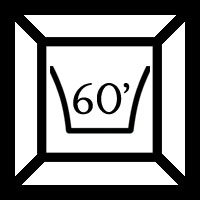
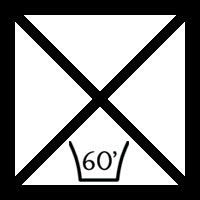
Symbol - Open Pit with Depth Symbol - Closed Pit with Depth

It looks perhaps a trifle redundant on the open pit, but I’m guessing the consistency of iconography is worth it. Particularly since this same design can be used for pits and chimneys as desired.

And as a bonus, here’s a thought on indicating a spiked pit:
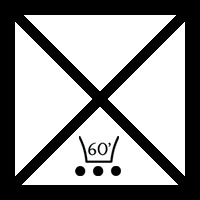
Symbol - Spiked Pit

What other common features do pits have that it might be useful to include on the map?RPG Blog Carnival

Go to Part 6: The Room Key

This post is part of the RPG Blog Carnival for Cartography.
Go to Part 1

One of my goals with this series of brainstorming posts is to find ways to encode as much data as possible onto the dungeon map itself. This is partly to supplement the map key, but it’s also about removing some types of information from the map key in order to make the key itself easier to use.

One example of that would be ceiling height. Although this information is often forgotten about entirely (which becomes increasingly problematic as the PCs start levitating and flying), if it were to be habitually included in the key it would become an extra bit of clutter to parse.

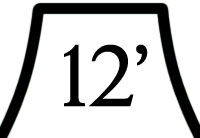
On the dungeon map, however, I think it adds clarity and can be easily referenced. Assuming, of course, that we have a clear method for doing it.

On cave maps, differences in elevation and height will often be indicated by simply listing numbers. For gaming maps, however, I’ve found that this approach – mixed with a numbered room key – often results in a confusing map. Different font sizes and/or text colors can aid in comprehension, but the layout still often comes across as fairly muddy to me.

Consider this solution adapted from Aeons & Auguries, however:

Ceiling Height Symbol

The symbol clearly sets off the number and allows quick identification for what this number (in a potential myriad of others) is referring to.

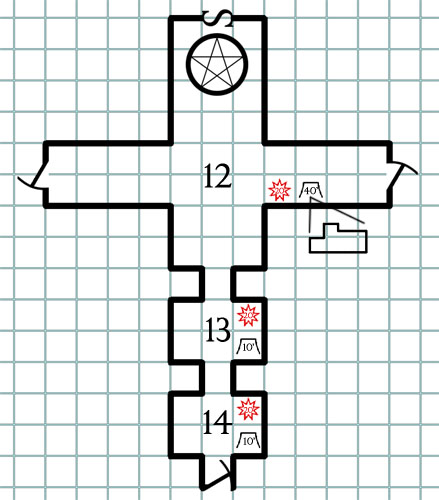
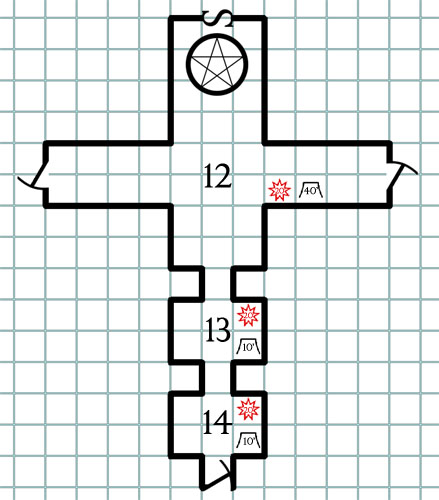
More generally, if we combine this with our symbol for light sources, I would argue that we have the basic workings for giving each room a “detail legend”. Let’s try it out:

Ceiling Height - Sample Map

Probably needs some tweaking on the starburst symbol in either size, design, or font to make it more legible. But the basic principles seem pretty sound and easy to read: At a glance I can tell that all three rooms are lit with candle-strength lights (20′ radius), while the ceiling in area 12 rises to a high vault 40′ above the heroes’ heads.

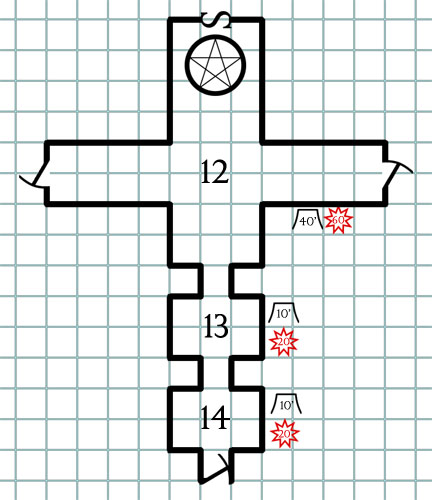
If the map allows, it would probably also be pretty easy to place the detail legend for a room next to the room, possibly with some kind of grouping iconography to make it clear which room the legend belongs to:

Ceiling Height - Sample Map 2

CEILING FORMS

What about unusual ceiling shapes? any way to get those on the map?

Here’s how the UIS keys ceiling forms for cave maps:

UIS Ceiling Forms

We could probably use a simple version of the same, keying from our ceiling height legend:

Ceiling Form - Sample Map

Not something you need for every room, but potentially useful for when those sorts of details become important.RPG Blog Carnival

Go to Part 5: Pit and Chimneys

This post is part of the RPG Blog Carnival for Cartography.
Savage WorldsSavage Worlds uses playing cards for initiative: Each round, everybody is dealt a playing card and the rank of the cards determines the order in which characters take their actions. The system has the advantage of being quick, intuitive, and transparent. (It’s very easy to glance around the table and immediately see when people will be taking their actions.)

Here’s a variant of the same idea designed for D20 or D20-like systems.

PLAYING CARD INITIATIVE

THE DEAL: Each round, deal each PC and each group of NPCs a playing card. Characters with an initiative bonus are dealt extra cards equal to their bonus and get to keep the best card dealt to them. Characters with an initiative penalty are dealt extra cards equal to their penalty and must keep the worst card dealt to them.

(For example, Peter the Brave has a+2 initiative bonus. He is dealt three cards — the single card that everyone receives automatically, plus two bonus cards from his initiative: A ten, a nine, and a jack. He keeps the jack.

Brazz the Slow, on the other hand, has a -1 initiative penalty. He’s dealt two cards: An eight and a six. He must take the six.)

THE COUNTDOWN: Once the cards are dealt, the GM simply counts down from Ace to Deuce with characters taking their turns when their card comes up. In the case of a tie, actions can be resolved simultaneously. If the tie must be broken, resolve by suit order in reverse alphabetical order: Spades, then Hearts, then Diamonds, and then Clubs.

JOKERS: Jokers are wild. When you’re dealt a joker you can keep it even if you have an initiative penalty. A joker allows you to go whenever you want in a round, even if it means interrupting another character’s action with your full turn! In addition, you gain a +2 bonus to all checks and damage rolls for the round.

SHUFFLING: Reshuffle the deck after any round in which a Joker was dealt.

VARIANTS

TRADITIONAL VARIANT: Instead of drawing each round, you can simply draw once for the full combat. When characters take a readied or delayed action that changes their initiative, it’s recommended that players fish out a card of the correct value.

UTILITY VARIANT: Designate one of the players as the dealer. The GM can just tell them how many cards he needs and let them handle the actual dealing of the cards. Alternatively, if you’re all right handling simultaneous action resolution, there’s no reason the GM and players couldn’t have separate decks.

POKER VARIANT: For completely dissociated wackiness, let the players form poker hands by taking collective actions with various bonuses depending on the hand formed. Many poker hands, of course, would require some of the players to delay their actions for the round. (For example, two players with a pair attacking the same target could each deal double damage. What might a royal flush be worth?)

Go to Part 1

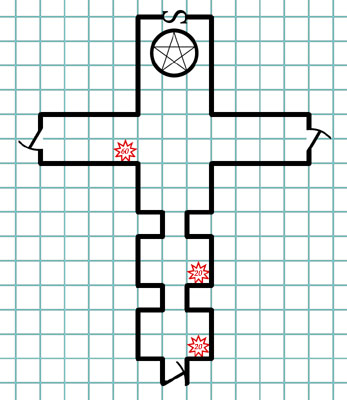
Light can be seen at great distances, which means that what a PC can actually see will often be determined by lights sources in a dozen different locations. When those light sources are only referenced in the location keys, it becomes almost trivial for errors to be made.

Player: Okay, we head through the arch.

GM: The arch leads to a vaulted chamber perhaps forty feet long lit with an eery red light which glistens off the blood streaming down the walls. The light seems to be pulsing from a glowing heart which hovers in the middle of the chamber.

Player: Man, I feel like we probably should have noticed that during the half hour we spent searching the room right next door.

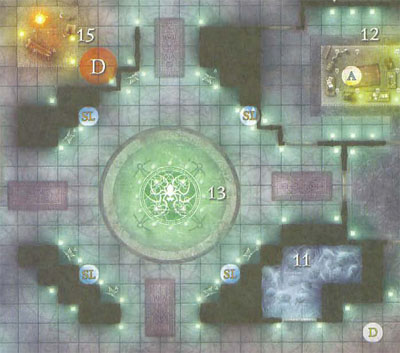
Some modern maps will take advantage of their “photo realistic” appearance to denote illumination or light sources. For an extreme example, here’s a sample from Fane of the Drow (a product from what I refer to as the Effervescent Period of WotC cartography):

Fane of the Drow - Wizards of the Coast

But I’ve struggle to find a method that can be used with perfect clarity, particularly when it comes to more utilitarian maps. (Like those that you would draw for yourself.)

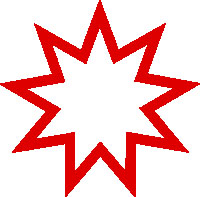
Roger the GS, however, has recently proposed using a red starburst symbol. The resolution on his reference document was a little low for my use, so I’ve re-engineered it:

Light Source Symbol

I like this symbol a lot. It’s simple, intuitive, and universal in its form. It doesn’t necessarily require the color-coding, but certainly benefits from it.

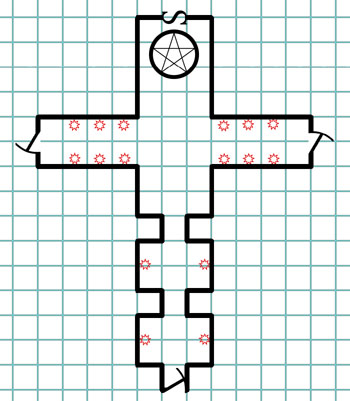
But let’s take a moment to consider the best way to use the symbol. For example we could use small versions of the symbol to indicate every light source, as shown in this map of a long hallway lit by sconces:

Light Source Test 1

This has a lot of obvious utility, but could also very quickly lead to unnecessarily cluttered maps.

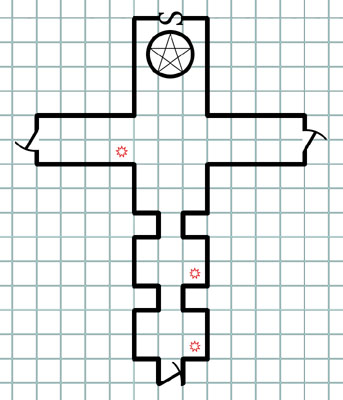
Another option would be to use a solitary symbol to mean “there’s a light source in this room”:

Light Source Test 2

Less information being conveyed, but also less clutter.

A third option would be to use a slightly larger symbol to encode the size of the light source (as measured in its radius of illumination). The size require for legible digits makes this a poor fit for “every source of illumination”, but it combines well with the “one symbol per room” method:

Light Source Test 3

Thoughts? Which method seems most useful to you?RPG Blog Carnival

Go to Part 4: Ceilings

This post is part of the RPG Blog Carnival for Cartography.
Go to Part 1

As we continue our Better Dungeon Maps project, let’s turn our attention to stairs. And basically, when it comes to stairs, there are two pieces of information we want encoded on the map: First, the direction the stairs are going (up or down). Second, where the stairs are going.

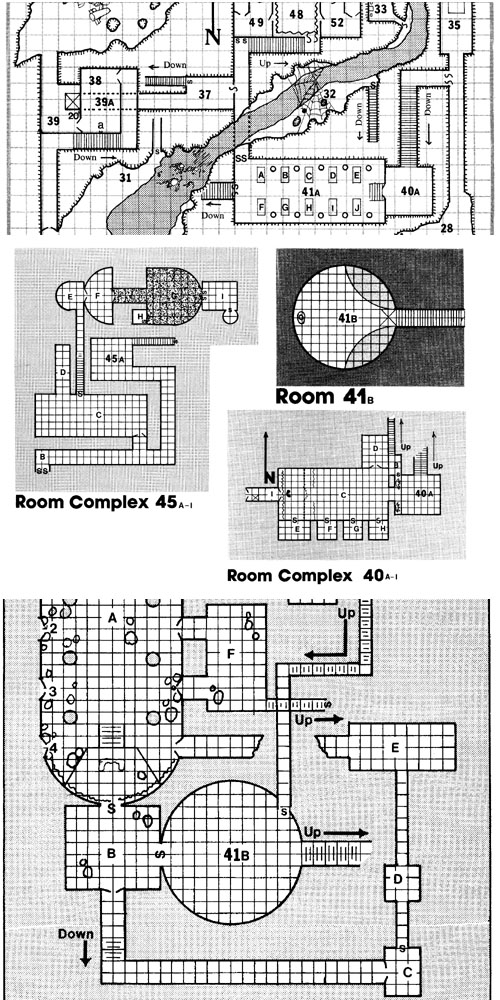
Let’s start by demonstrating the potential pitfalls of not encoding this information. I’ve often sung the praises of Jennell Jaquay’s Caverns of Thracia here before, but this is one place where it falls down painfully. Here’s a sample of maps from the module:

Caverns of Thracia - Second Level Map Selection

(click for larger image)

All of these maps connect to each other, but I doubt you’ll be able to puzzle out how those connections actually work. (Frustratingly, even the dungeon key won’t help you much.) When I was first prepping the module I spent the better part of half an hour trying to figure out which stairs connected to each other and then marked those connections on the map.

You can easily note, however, that the maps for the Caverns of Thracia clearly indicate up/down directions for the stairs. But it should be relatively easy to imagine what would happen if you removed those text labels, leaving you with undistinguished and enigmatical lines to puzzle over.

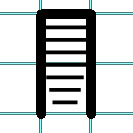
Fortunately, the problem of indicating directionality for common stairs is largely a solved one:

Stairs

The stairs taper in the direction of descent. (So the lowest portion of the stairs is located at the bottom of the picture above.)

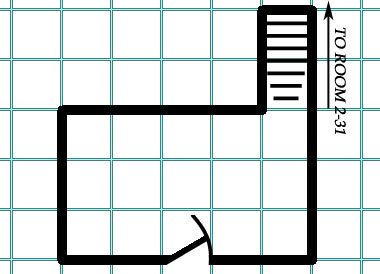
But adventure modules are still maddeningly inconsistent when it comes to clearly indicating where the stairs go, despite the fact that doing so is so utterly trivial:

Stairs with Destination Label

For example, Keep on the Shadowfell indicates the destination of only one-third of the stairs on its maps.

(Another option I’ve seen is to key the stairs: So that Staircase A on Map 1 logically leads to Staircase A on Map 2. This can work. But since it’s usually just as easy to label the destination, as shown above, it’s probably the better option.)

SPIRAL STAIRCASES

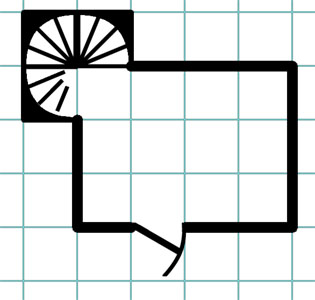
Spiral staircases, however, aren’t quite so straight-forward. Here’s a typical example from I6 Castle Ravenloft:

Spiral Stairs - Castle Ravenloft

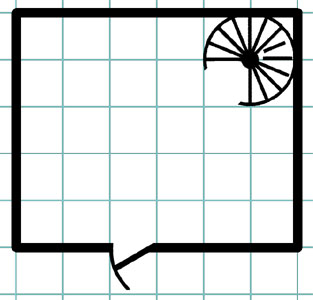
It would be easy enough to supply a destination label for those stairs, but there’s really no way to tell whether they’re curving up or down.

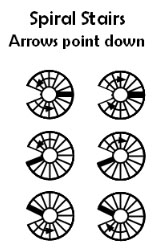
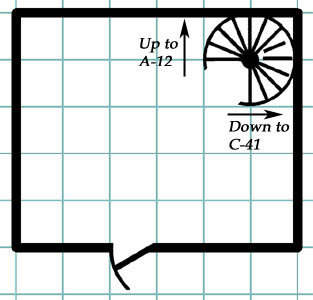
Roger the GS has recently proposed this solution:

Spiral Stairs - Roger the GS

Which seems like a good stab in the right direction. My only quibble with this is that it is not immediately apparent at a glance which direction the arrows are pointing. (They could just as easily be indicating the direction in which the stairs are ascending.)

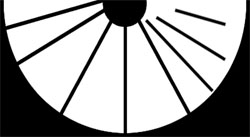
It’s tempting to apply the same tapering solution we use for straight stairs to the problem. To my eye, something like this looks fairly acceptable:

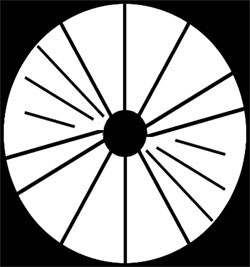
Spiral Staircase - Half

Even when extended to a three-quarters design, the iconography seems to remain fairly clear:

Spiral Staircase - Three-Quarters

But when you need to show the stair case spiraling both up and down from the same level, the result is considerably less satisfying:

Spiral Staircase - Full

Hypothetically you could only have it taper at the absolute nadir of the stairs as pictured, but even with tweaking this seems very unclear to my eyes:

Spiral Stairs - Three Quarters

I’m increasingly convinced that labeled arrows may be the clearest way to go with spiral staircases. But do the arrows necessarily need to curve just because the stairs do?

Stairs - Labeled Spiral

Here the double visual coding of the symbol (somewhat unclear on its own) in combination with the arrows seems, to my eye at least, to have greater clarity than either by itself.

On the other hand, here’s a final example from Dyson Logos’ Ruins of the Gorgon:

Spiral Stairs - Dyson Logos

Dyson uses a side-view map to make the destination of each stair relatively clear. (Although double-coding the info with a text reference could only add to clarity.)

At the end of the day, I still feel fairly stymied when it comes to providing a nice, clear icongraphy for spiral stairs. Your thoughts?RPG Blog Carnival

Go to Part 3: Light Sources

This post is part of the RPG Blog Carnival for Cartography.
Archives

Recent Posts

Recent Comments

Copyright © The Alexandrian. All rights reserved.